


Why Growing Businesses Outgrow Basic Accounting Systems

Table of Contents
Why Financial Management Gets Harder as Your Business Grows
- Costs: Are your expenses growing faster than your revenue?
- Cash flow: Will you have enough cash to cover upcoming payroll and supplier payments?
- Performance: Are higher sales translating into higher profits?
- Growth: How much can you afford to invest in your next step?
5 Signs Your Business Has Outgrown Its Accounting System
Using Spreadsheets to Fill Reporting Gaps
You Cannot Get the Financial Reports You Need
Reconciling Transactions Takes Too Much Time
Your team must compare bank statements, invoices, payment records, and accounting entries to make sure the figures match. For most small businesses, the business checking account is a main source of entries in the books. Bank reconciliation helps identify differences between bank activity and recorded transactions, while invoices and other supporting documents help verify the entries.
Your Accounting System Cannot Connect With Other Business Tools
You Struggle to Track Costs and Cash Flow
You may know how much revenue your business generates without having a clear view of its available cash, rising costs, or upcoming financial commitments. The Cash Flow Management Guide explains how to build that view.
What Accounting Systems for Growing Businesses Need to Do
- Accurate, timely financial reports: See revenue, expenses, and profits without spending hours gathering and checking figures.
- Clear cash-flow and cost visibility: Track incoming payments, upcoming expenses, and rising costs to understand what your business can afford.
- Connected financial tools: Transfer relevant information reliably between accounting, payroll, billing, and banking to keep records consistent and reduce repeated data entry.
- Scalable workflows: Support more transactions and users without a proportionate increase in manual work, with clear responsibilities and regular checks.
- Information for better decisions: Get the financial details you need to assess performance, plan spending, and evaluate growth opportunities.
- Records that support your tax return: The IRS lets you choose any recordkeeping system suited to your business, as long as it clearly shows income and expenses. Accounting software must meet the same basic recordkeeping principles.
Should You Upgrade Your Accounting System or Improve Your Existing Setup?
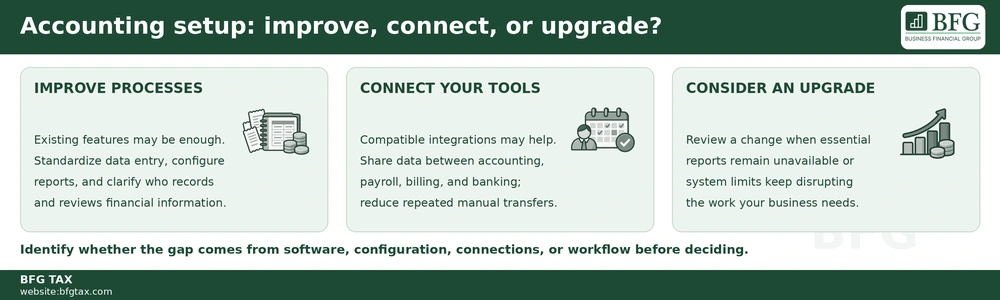
- Standardize data entry: Use consistent methods to record transactions and reduce errors.
- Improve reports: Configure existing reports to show the financial details you need.
- Clarify responsibilities: Make sure employees know who records, checks, and updates financial information, including receivables, payables, cash, bank reconciliation, and payroll.
When Integrations Can Fill the Gaps
- Connect financial tools: Share relevant data between accounting, payroll, billing, and banking.
- Reduce manual transfers: Avoid entering the same information into multiple systems.
- Improve reconciliation: Match transactions more efficiently and flag discrepancies for review.
When Upgrading Makes More Sense
- Essential reports remain unavailable: Your business needs financial details that the current system cannot provide.
- Daily operations face repeated limitations: Workarounds continue to delay reporting or disrupt routine financial tasks.
- Your needs exceed the system’s capabilities: It cannot support the reporting, integrations, users, or transaction volumes your business requires.
- Financial reporting: Can you track revenue, expenses, profits, and cash flow in the detail you need?
- Transaction volume and growth: Can the system handle your current workload and expected increase in transactions?
- Integrations and automation: Can it connect with your payroll, billing, and banking tools to reduce manual work?
- Access and usability: Can your team use it efficiently, with appropriate access controls for financial data?
- Records and retention: Can the system store, organize, and retrieve the financial and supporting records your business needs? The IRS requires businesses to retain employment tax records for at least four years.
- Implementation and total cost: Can you afford the subscription, setup, migration, training, and ongoing maintenance?
Related: Small Business Accounting Systems
When to Get Help Evaluating Your Business Financial Systems
- Financial reports remain incomplete: You struggle to get a reliable view of revenue, expenses, or cash flow.
- Manual work keeps returning: Your team still spends hours transferring data, matching records, or correcting errors despite process improvements.
- You are unsure what to change: You cannot determine whether your business needs better workflows, new integrations, or a different accounting system.
Conclusion
Frequently Asked Questions
When should a business upgrade its accounting system?
How do accounting systems affect business growth?
How can you tell when your accounting system is no longer enough?
What are common accounting system problems for growing businesses?
What should accounting systems for growing businesses include?
Choose the Next Step for Your Business
Find the Right Financial Setup for Your Business
Your accounting system should give you a clear view of your finances and support your next stage of growth. If your current setup falls short, BFG Tax, a Business Financial Group company, can help you evaluate your accounting processes, reporting needs, and financial workflows to identify where improvements may be needed.
In a 30- to 45-minute virtual Strategy Session, we discuss your current financial setup, reporting challenges, and business goals to identify an appropriate next step.
Have a question before booking?
Contact BFG Tax or call 844-BFG-4TAX.
Table of Contents
Why Financial Management Gets Harder as Your Business Grows
- Costs: Are your expenses growing faster than your revenue?
- Cash flow: Will you have enough cash to cover upcoming payroll and supplier payments?
- Performance: Are higher sales translating into higher profits?
- Growth: How much can you afford to invest in your next step?
5 Signs Your Business Has Outgrown Its Accounting System
Using Spreadsheets to Fill Reporting Gaps
You Cannot Get the Financial Reports You Need
Reconciling Transactions Takes Too Much Time
Your team must compare bank statements, invoices, payment records, and accounting entries to make sure the figures match. For most small businesses, the business checking account is a main source of entries in the books. Bank reconciliation helps identify differences between bank activity and recorded transactions, while invoices and other supporting documents help verify the entries.
Your Accounting System Cannot Connect With Other Business Tools
You Struggle to Track Costs and Cash Flow
You may know how much revenue your business generates without having a clear view of its available cash, rising costs, or upcoming financial commitments. The Cash Flow Management Guide explains how to build that view.
What Accounting Systems for Growing Businesses Need to Do
- Accurate, timely financial reports: See revenue, expenses, and profits without spending hours gathering and checking figures.
- Clear cash-flow and cost visibility: Track incoming payments, upcoming expenses, and rising costs to understand what your business can afford.
- Connected financial tools: Transfer relevant information reliably between accounting, payroll, billing, and banking to keep records consistent and reduce repeated data entry.
- Scalable workflows: Support more transactions and users without a proportionate increase in manual work, with clear responsibilities and regular checks.
- Information for better decisions: Get the financial details you need to assess performance, plan spending, and evaluate growth opportunities.
- Records that support your tax return: The IRS lets you choose any recordkeeping system suited to your business, as long as it clearly shows income and expenses. Accounting software must meet the same basic recordkeeping principles.
Should You Upgrade Your Accounting System or Improve Your Existing Setup?
- Standardize data entry: Use consistent methods to record transactions and reduce errors.
- Improve reports: Configure existing reports to show the financial details you need.
- Clarify responsibilities: Make sure employees know who records, checks, and updates financial information, including receivables, payables, cash, bank reconciliation, and payroll.
When Integrations Can Fill the Gaps
- Connect financial tools: Share relevant data between accounting, payroll, billing, and banking.
- Reduce manual transfers: Avoid entering the same information into multiple systems.
- Improve reconciliation: Match transactions more efficiently and flag discrepancies for review.
When Upgrading Makes More Sense
- Essential reports remain unavailable: Your business needs financial details that the current system cannot provide.
- Daily operations face repeated limitations: Workarounds continue to delay reporting or disrupt routine financial tasks.
- Your needs exceed the system’s capabilities: It cannot support the reporting, integrations, users, or transaction volumes your business requires.
- Financial reporting: Can you track revenue, expenses, profits, and cash flow in the detail you need?
- Transaction volume and growth: Can the system handle your current workload and expected increase in transactions?
- Integrations and automation: Can it connect with your payroll, billing, and banking tools to reduce manual work?
- Access and usability: Can your team use it efficiently, with appropriate access controls for financial data?
- Records and retention: Can the system store, organize, and retrieve the financial and supporting records your business needs? The IRS requires businesses to retain employment tax records for at least four years.
- Implementation and total cost: Can you afford the subscription, setup, migration, training, and ongoing maintenance?
Related: Small Business Accounting Systems
When to Get Help Evaluating Your Business Financial Systems
- Financial reports remain incomplete: You struggle to get a reliable view of revenue, expenses, or cash flow.
- Manual work keeps returning: Your team still spends hours transferring data, matching records, or correcting errors despite process improvements.
- You are unsure what to change: You cannot determine whether your business needs better workflows, new integrations, or a different accounting system.
Conclusion
Frequently Asked Questions
When should a business upgrade its accounting system?
How do accounting systems affect business growth?
How can you tell when your accounting system is no longer enough?
What are common accounting system problems for growing businesses?
What should accounting systems for growing businesses include?
Choose the Next Step for Your Business
Find the Right Financial Setup for Your Business
Your accounting system should give you a clear view of your finances and support your next stage of growth. If your current setup falls short, BFG Tax, a Business Financial Group company, can help you evaluate your accounting processes, reporting needs, and financial workflows to identify where improvements may be needed.
In a 30- to 45-minute virtual Strategy Session, we discuss your current financial setup, reporting challenges, and business goals to identify an appropriate next step.
Have a question before booking?
Contact BFG Tax or call 844-BFG-4TAX.
Related BFG Tax Resources
This article provides general educational information and is not a substitute for individualized accounting, legal, or tax advice.