
Why Growing Businesses Outgrow Basic Accounting Systems

Home » Blog » Why Growing Businesses Outgrow Basic Accounting Systems

Why Growing Businesses Outgrow Basic Accounting Systems

Accounting systems for growing businesses need to support reliable records, timely reports, and a clear view of cash flow. When your current setup falls short, review whether better processes, stronger integrations, or different software would address the problem.

Why Financial Management Gets Harder as Your Business Grows

As your business grows, financial activity increases. You handle more customers, process more payments, hire more employees, and pay more suppliers. Keeping track of everything becomes harder.
You also need to answer more important financial questions:
  • Costs: Are your expenses growing faster than your revenue?
  • Cash flow: Will you have enough cash to cover upcoming payroll and supplier payments?
  • Performance: Are higher sales translating into higher profits?
  • Growth: How much can you afford to invest in your next step?
Answering these questions requires accurate, up-to-date financial information. But as transactions increase, your team must also spend more time recording entries, checking figures, and keeping records up to date. The result is less time to understand financial performance and plan what comes next.

5 Signs Your Business Has Outgrown Its Accounting System

As your business grows, the way you manage its finances should keep pace. Look for these signs to understand whether your current accounting setup still meets your needs.

Using Spreadsheets to Fill Reporting Gaps

You may rely on spreadsheets to combine figures, track missing details, or prepare reports your accounting system cannot generate. These workarounds may help at first, but as transactions increase, they add more work and make records harder to keep up to date.

You Cannot Get the Financial Reports You Need

You want to know which products are profitable, where costs are rising, or how different parts of your business are performing. But your accounting system may not provide the level of detail you need.
When reports cannot answer these questions, you have to spend more time gathering information before you can decide what to do.

Reconciling Transactions Takes Too Much Time

Your team must compare bank statements, invoices, payment records, and accounting entries to make sure the figures match. For most small businesses, the business checking account is a main source of entries in the books. Bank reconciliation helps identify differences between bank activity and recorded transactions, while invoices and other supporting documents help verify the entries.

As transaction volumes grow, this work takes longer and delays the preparation of accurate financial records.

Your Accounting System Cannot Connect With Other Business Tools

Your business uses separate tools for payroll, billing, banking, or inventory. If these tools cannot share information reliably, employees must transfer data manually or maintain the same records in different places.
This adds work and creates more opportunities for errors. Better integrations may resolve the problem without requiring a complete system replacement.
This challenge can be particularly visible in growing home healthcare agencies. Caregiver payroll, client billing, payer reimbursements, and financial reporting may be handled through separate systems. When the information does not flow reliably between them, agency owners may struggle to track labor costs, monitor collections, and understand profitability.

You Struggle to Track Costs and Cash Flow

You need to know how much cash is available, which payments are due, and how much your business can afford to spend. But if financial information is incomplete or out of date, these questions become harder to answer.

You may know how much revenue your business generates without having a clear view of its available cash, rising costs, or upcoming financial commitments. The Cash Flow Management Guide explains how to build that view.

These signs help you identify where your current setup falls short. Next, determine whether better processes, stronger integrations, or a more capable accounting system can close those gaps.

What Accounting Systems for Growing Businesses Need to Do

As your business grows, you need more than a record of sales and expenses. You need accurate financial information to track performance, manage cash, and decide where to invest. Your accounting system should support these needs without adding unnecessary work.
Here is what to look for:
  • Accurate, timely financial reports: See revenue, expenses, and profits without spending hours gathering and checking figures.
  • Clear cash-flow and cost visibility: Track incoming payments, upcoming expenses, and rising costs to understand what your business can afford.
  • Connected financial tools: Transfer relevant information reliably between accounting, payroll, billing, and banking to keep records consistent and reduce repeated data entry.
  • Scalable workflows: Support more transactions and users without a proportionate increase in manual work, with clear responsibilities and regular checks.
  • Information for better decisions: Get the financial details you need to assess performance, plan spending, and evaluate growth opportunities.
  • Records that support your tax return: The IRS lets you choose any recordkeeping system suited to your business, as long as it clearly shows income and expenses. Accounting software must meet the same basic recordkeeping principles.
The right accounting setup depends on your business’s needs, not the number of features it offers. Small business accounting systems vary in what they include, so compare each against these needs. Before choosing a new system, determine which of these needs your current setup already meets and where it falls short.

Should You Upgrade Your Accounting System or Improve Your Existing Setup?
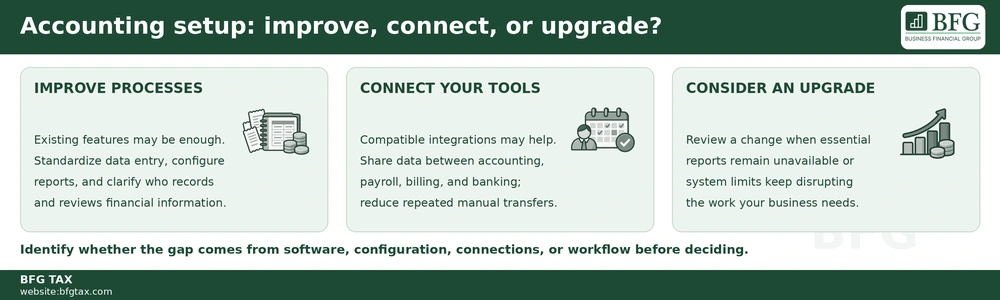
Not every accounting problem requires a new system. Some problems come from how your team records transactions or prepares reports. Others arise because your financial tools cannot share information. An upgrade makes sense when your current setup cannot meet essential business needs.
Before deciding to upgrade, identify whether the problem comes from the software, its configuration, missing connections, or the surrounding workflow.
When Better Processes May Be Enough
Your current system may have the features you need, but your team may not be using them effectively. In these cases, improving the workflow can solve the problem without adding another tool.
Start by checking whether you can:
  • Standardize data entry: Use consistent methods to record transactions and reduce errors.
  • Improve reports: Configure existing reports to show the financial details you need.
  • Clarify responsibilities: Make sure employees know who records, checks, and updates financial information, including receivables, payables, cash, bank reconciliation, and payroll.
If these changes resolve the gaps, you may not need to replace your current system.

When Integrations Can Fill the Gaps

Your accounting system may handle its own tasks well but operate separately from payroll, billing, or banking. This forces employees to transfer information and reconcile records manually.
Check whether compatible integrations can:
  • Connect financial tools: Share relevant data between accounting, payroll, billing, and banking.
  • Reduce manual transfers: Avoid entering the same information into multiple systems.
  • Improve reconciliation: Match transactions more efficiently and flag discrepancies for review.
If the tools can exchange information reliably, integrations may address the problem without a complete system replacement.

When Upgrading Makes More Sense

Sometimes, better processes and integrations cannot overcome the limits of your current system. An upgrade may be necessary when:
  • Essential reports remain unavailable: Your business needs financial details that the current system cannot provide.
  • Daily operations face repeated limitations: Workarounds continue to delay reporting or disrupt routine financial tasks.
  • Your needs exceed the system’s capabilities: It cannot support the reporting, integrations, users, or transaction volumes your business requires.
Before upgrading, compare these needs with the capabilities and costs of alternatives. The goal is not to buy the most advanced system, but to choose one that solves the problems your business actually faces.
How to Choose an Accounting System for a Growing Business
Start by identifying what your current accounting setup cannot handle. Compare alternatives against the reporting, transaction volume, user access, and integrations your business needs now and expects to need as it grows. Capabilities vary by product and subscription, so test each option before deciding.
Use these points to compare your options:
  • Financial reporting: Can you track revenue, expenses, profits, and cash flow in the detail you need?
  • Transaction volume and growth: Can the system handle your current workload and expected increase in transactions?
  • Integrations and automation: Can it connect with your payroll, billing, and banking tools to reduce manual work?
  • Access and usability: Can your team use it efficiently, with appropriate access controls for financial data?
  • Records and retention: Can the system store, organize, and retrieve the financial and supporting records your business needs? The IRS requires businesses to retain employment tax records for at least four years.
  • Implementation and total cost: Can you afford the subscription, setup, migration, training, and ongoing maintenance?
Compare these requirements against your current system before making a decision. The right choice should address your existing problems, support your next stage of growth, and justify the cost of changing.

When to Get Help Evaluating Your Business Financial Systems

You may be able to fix some financial problems by improving your existing processes or connecting your tools. But if reports remain difficult to prepare, manual workarounds continue, or you still cannot get the information you need, it may be time to seek help.
Consider getting professional support when:
  • Financial reports remain incomplete: You struggle to get a reliable view of revenue, expenses, or cash flow.
  • Manual work keeps returning: Your team still spends hours transferring data, matching records, or correcting errors despite process improvements.
  • You are unsure what to change: You cannot determine whether your business needs better workflows, new integrations, or a different accounting system.
An accounting or financial advisor can help you review your reporting needs, existing processes, and system limitations. This review can help you identify the source of the problem and decide which changes are worth making before investing in a new system.
Explore BFG Tax’s Financial Systems Implementation for help coordinating financial tools and workflows. Accounting & Bookkeeping Solutions, CFO Advisory Solutions, Payroll Solutions, and Cash Flow Management can support the related financial records, analysis, payroll responsibilities, and cash flow visibility.

Conclusion

As your business grows, your financial needs change. Accounting systems for growing businesses have to keep pace with the transactions, reporting, and decisions that come with that growth.
Before investing in a new system, identify what your current setup cannot handle. Better processes or integrations may solve the problem. If your system still falls short, upgrading may be the right next step.
The goal is not to change your accounting system for the sake of growth. It is to make sure your financial setup supports where your business is going.

Frequently Asked Questions

When should a business upgrade its accounting system?

When essential reports remain unavailable, workarounds keep delaying reporting, or your needs exceed what the system can support in reporting, integrations, users, or transaction volume. If better processes or integrations close those gaps, an upgrade may not be necessary.

How do accounting systems affect business growth?

Your accounting setup affects how quickly you can see revenue, costs, and cash, and how much work is needed to maintain accurate records. Reliable information supports decisions, while delays and unexplained errors can make planning harder.

How can you tell when your accounting system is no longer enough?

Look for reporting gaps, repeated spreadsheet workarounds, slow reconciliation, unreliable connections, and difficulty tracking costs or cash flow. Several signs justify a closer review, but do not prove that the software needs replacing. Check processes, configuration, and integrations first.

What are common accounting system problems for growing businesses?

The common problems are incomplete reports, manual data transfers between payroll, billing, and banking, slow reconciliation, and limited visibility into cash flow and rising costs.

What should accounting systems for growing businesses include?

Look for timely reports, useful cost and cash-flow information, reliable connections between tools, appropriate access controls, and records that support tax reporting. Workflows should accommodate growth without a proportionate increase in manual work.

Choose the Next Step for Your Business

Find the Right Financial Setup for Your Business

Your accounting system should give you a clear view of your finances and support your next stage of growth. If your current setup falls short, BFG Tax, a Business Financial Group company, can help you evaluate your accounting processes, reporting needs, and financial workflows to identify where improvements may be needed.

In a 30- to 45-minute virtual Strategy Session, we discuss your current financial setup, reporting challenges, and business goals to identify an appropriate next step.

Have a question before booking?
Contact BFG Tax or call 844-BFG-4TAX.

Why Financial Management Gets Harder as Your Business Grows

As your business grows, financial activity increases. You handle more customers, process more payments, hire more employees, and pay more suppliers. Keeping track of everything becomes harder.
You also need to answer more important financial questions:
  • Costs: Are your expenses growing faster than your revenue?
  • Cash flow: Will you have enough cash to cover upcoming payroll and supplier payments?
  • Performance: Are higher sales translating into higher profits?
  • Growth: How much can you afford to invest in your next step?
Answering these questions requires accurate, up-to-date financial information. But as transactions increase, your team must also spend more time recording entries, checking figures, and keeping records up to date. The result is less time to understand financial performance and plan what comes next.

5 Signs Your Business Has Outgrown Its Accounting System

As your business grows, the way you manage its finances should keep pace. Look for these signs to understand whether your current accounting setup still meets your needs.

Using Spreadsheets to Fill Reporting Gaps

You may rely on spreadsheets to combine figures, track missing details, or prepare reports your accounting system cannot generate. These workarounds may help at first, but as transactions increase, they add more work and make records harder to keep up to date.

You Cannot Get the Financial Reports You Need

You want to know which products are profitable, where costs are rising, or how different parts of your business are performing. But your accounting system may not provide the level of detail you need.
When reports cannot answer these questions, you have to spend more time gathering information before you can decide what to do.

Reconciling Transactions Takes Too Much Time

Your team must compare bank statements, invoices, payment records, and accounting entries to make sure the figures match. For most small businesses, the business checking account is a main source of entries in the books. Bank reconciliation helps identify differences between bank activity and recorded transactions, while invoices and other supporting documents help verify the entries.

As transaction volumes grow, this work takes longer and delays the preparation of accurate financial records.

Your Accounting System Cannot Connect With Other Business Tools

Your business uses separate tools for payroll, billing, banking, or inventory. If these tools cannot share information reliably, employees must transfer data manually or maintain the same records in different places.
This adds work and creates more opportunities for errors. Better integrations may resolve the problem without requiring a complete system replacement.
This challenge can be particularly visible in growing home healthcare agencies. Caregiver payroll, client billing, payer reimbursements, and financial reporting may be handled through separate systems. When the information does not flow reliably between them, agency owners may struggle to track labor costs, monitor collections, and understand profitability.

You Struggle to Track Costs and Cash Flow

You need to know how much cash is available, which payments are due, and how much your business can afford to spend. But if financial information is incomplete or out of date, these questions become harder to answer.

You may know how much revenue your business generates without having a clear view of its available cash, rising costs, or upcoming financial commitments. The Cash Flow Management Guide explains how to build that view.

These signs help you identify where your current setup falls short. Next, determine whether better processes, stronger integrations, or a more capable accounting system can close those gaps.

What Accounting Systems for Growing Businesses Need to Do

As your business grows, you need more than a record of sales and expenses. You need accurate financial information to track performance, manage cash, and decide where to invest. Your accounting system should support these needs without adding unnecessary work.
Here is what to look for:
  • Accurate, timely financial reports: See revenue, expenses, and profits without spending hours gathering and checking figures.
  • Clear cash-flow and cost visibility: Track incoming payments, upcoming expenses, and rising costs to understand what your business can afford.
  • Connected financial tools: Transfer relevant information reliably between accounting, payroll, billing, and banking to keep records consistent and reduce repeated data entry.
  • Scalable workflows: Support more transactions and users without a proportionate increase in manual work, with clear responsibilities and regular checks.
  • Information for better decisions: Get the financial details you need to assess performance, plan spending, and evaluate growth opportunities.
  • Records that support your tax return: The IRS lets you choose any recordkeeping system suited to your business, as long as it clearly shows income and expenses. Accounting software must meet the same basic recordkeeping principles.
The right accounting setup depends on your business’s needs, not the number of features it offers. Small business accounting systems vary in what they include, so compare each against these needs. Before choosing a new system, determine which of these needs your current setup already meets and where it falls short.

Should You Upgrade Your Accounting System or Improve Your Existing Setup?

Not every accounting problem requires a new system. Some problems come from how your team records transactions or prepares reports. Others arise because your financial tools cannot share information. An upgrade makes sense when your current setup cannot meet essential business needs.
Before deciding to upgrade, identify whether the problem comes from the software, its configuration, missing connections, or the surrounding workflow.
When Better Processes May Be Enough
Your current system may have the features you need, but your team may not be using them effectively. In these cases, improving the workflow can solve the problem without adding another tool.
Start by checking whether you can:
  • Standardize data entry: Use consistent methods to record transactions and reduce errors.
  • Improve reports: Configure existing reports to show the financial details you need.
  • Clarify responsibilities: Make sure employees know who records, checks, and updates financial information, including receivables, payables, cash, bank reconciliation, and payroll.
If these changes resolve the gaps, you may not need to replace your current system.

When Integrations Can Fill the Gaps

Your accounting system may handle its own tasks well but operate separately from payroll, billing, or banking. This forces employees to transfer information and reconcile records manually.
Check whether compatible integrations can:
  • Connect financial tools: Share relevant data between accounting, payroll, billing, and banking.
  • Reduce manual transfers: Avoid entering the same information into multiple systems.
  • Improve reconciliation: Match transactions more efficiently and flag discrepancies for review.
If the tools can exchange information reliably, integrations may address the problem without a complete system replacement.

When Upgrading Makes More Sense

Sometimes, better processes and integrations cannot overcome the limits of your current system. An upgrade may be necessary when:
  • Essential reports remain unavailable: Your business needs financial details that the current system cannot provide.
  • Daily operations face repeated limitations: Workarounds continue to delay reporting or disrupt routine financial tasks.
  • Your needs exceed the system’s capabilities: It cannot support the reporting, integrations, users, or transaction volumes your business requires.
Before upgrading, compare these needs with the capabilities and costs of alternatives. The goal is not to buy the most advanced system, but to choose one that solves the problems your business actually faces.
How to Choose an Accounting System for a Growing Business
Start by identifying what your current accounting setup cannot handle. Compare alternatives against the reporting, transaction volume, user access, and integrations your business needs now and expects to need as it grows. Capabilities vary by product and subscription, so test each option before deciding.
Use these points to compare your options:
  • Financial reporting: Can you track revenue, expenses, profits, and cash flow in the detail you need?
  • Transaction volume and growth: Can the system handle your current workload and expected increase in transactions?
  • Integrations and automation: Can it connect with your payroll, billing, and banking tools to reduce manual work?
  • Access and usability: Can your team use it efficiently, with appropriate access controls for financial data?
  • Records and retention: Can the system store, organize, and retrieve the financial and supporting records your business needs? The IRS requires businesses to retain employment tax records for at least four years.
  • Implementation and total cost: Can you afford the subscription, setup, migration, training, and ongoing maintenance?
Compare these requirements against your current system before making a decision. The right choice should address your existing problems, support your next stage of growth, and justify the cost of changing.

When to Get Help Evaluating Your Business Financial Systems

You may be able to fix some financial problems by improving your existing processes or connecting your tools. But if reports remain difficult to prepare, manual workarounds continue, or you still cannot get the information you need, it may be time to seek help.
Consider getting professional support when:
  • Financial reports remain incomplete: You struggle to get a reliable view of revenue, expenses, or cash flow.
  • Manual work keeps returning: Your team still spends hours transferring data, matching records, or correcting errors despite process improvements.
  • You are unsure what to change: You cannot determine whether your business needs better workflows, new integrations, or a different accounting system.
An accounting or financial advisor can help you review your reporting needs, existing processes, and system limitations. This review can help you identify the source of the problem and decide which changes are worth making before investing in a new system.
Explore BFG Tax’s Financial Systems Implementation for help coordinating financial tools and workflows. Accounting & Bookkeeping Solutions, CFO Advisory Solutions, Payroll Solutions, and Cash Flow Management can support the related financial records, analysis, payroll responsibilities, and cash flow visibility.

Conclusion

As your business grows, your financial needs change. Accounting systems for growing businesses have to keep pace with the transactions, reporting, and decisions that come with that growth.
Before investing in a new system, identify what your current setup cannot handle. Better processes or integrations may solve the problem. If your system still falls short, upgrading may be the right next step.
The goal is not to change your accounting system for the sake of growth. It is to make sure your financial setup supports where your business is going.

Frequently Asked Questions

When should a business upgrade its accounting system?

When essential reports remain unavailable, workarounds keep delaying reporting, or your needs exceed what the system can support in reporting, integrations, users, or transaction volume. If better processes or integrations close those gaps, an upgrade may not be necessary.

How do accounting systems affect business growth?

Your accounting setup affects how quickly you can see revenue, costs, and cash, and how much work is needed to maintain accurate records. Reliable information supports decisions, while delays and unexplained errors can make planning harder.

How can you tell when your accounting system is no longer enough?

Look for reporting gaps, repeated spreadsheet workarounds, slow reconciliation, unreliable connections, and difficulty tracking costs or cash flow. Several signs justify a closer review, but do not prove that the software needs replacing. Check processes, configuration, and integrations first.

What are common accounting system problems for growing businesses?

The common problems are incomplete reports, manual data transfers between payroll, billing, and banking, slow reconciliation, and limited visibility into cash flow and rising costs.

What should accounting systems for growing businesses include?

Look for timely reports, useful cost and cash-flow information, reliable connections between tools, appropriate access controls, and records that support tax reporting. Workflows should accommodate growth without a proportionate increase in manual work.

Choose the Next Step for Your Business

Find the Right Financial Setup for Your Business

Your accounting system should give you a clear view of your finances and support your next stage of growth. If your current setup falls short, BFG Tax, a Business Financial Group company, can help you evaluate your accounting processes, reporting needs, and financial workflows to identify where improvements may be needed.

In a 30- to 45-minute virtual Strategy Session, we discuss your current financial setup, reporting challenges, and business goals to identify an appropriate next step.

Have a question before booking?
Contact BFG Tax or call 844-BFG-4TAX.

Related BFG Tax Resources

Disclaimer:
This article provides general educational information and is not a substitute for individualized accounting, legal, or tax advice.
Scroll to Top